

Mi Account Xiaomi / Poco unlock
$ 2.4 47.35Price range: $ 2.4 – $ 47.35
i.mi.com —check Find Device status
The service is intended for devices that require entering a Mi account after resetting their settings.
You can find out the activation country of the device through the service Checking Android devices by IMEI / SN
For example:
- Purchase Country: United Arab Emirates
- Activation Country: 俄罗斯联邦
Activation Country: 俄罗斯联邦 — Russian Federation > Russia / Kazakhstan
IMPORTANT INFORMATION
• Works only with “clean” devices
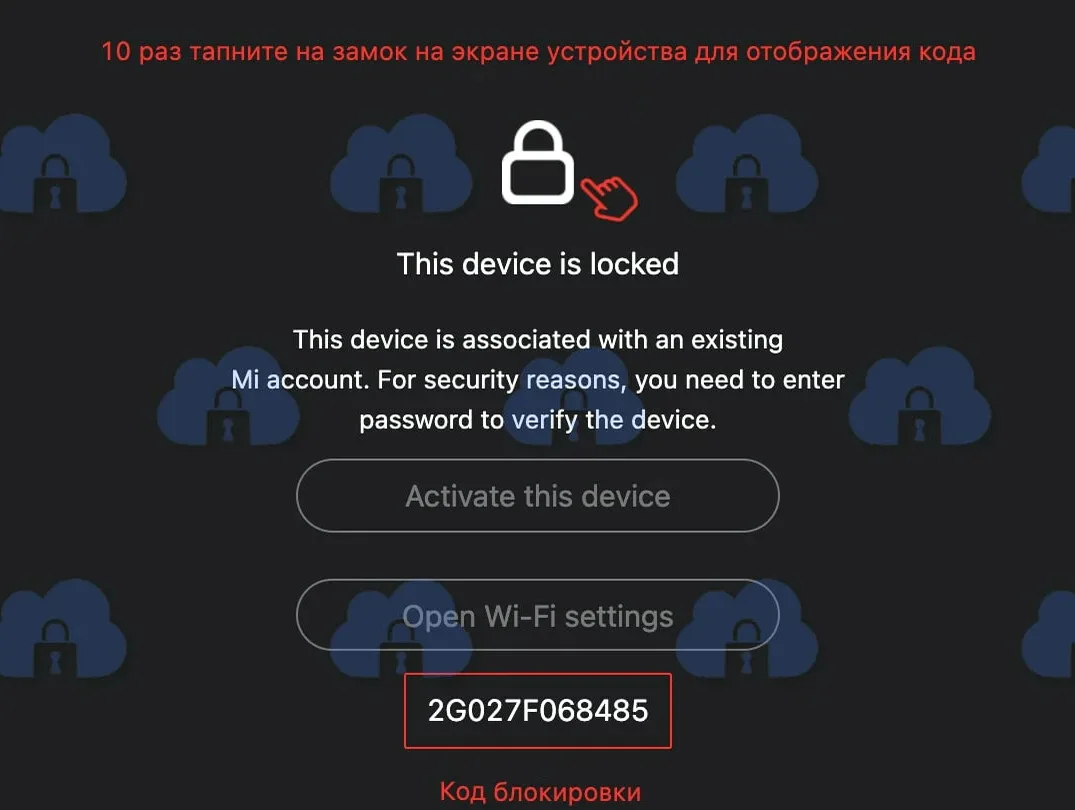
• Lock Code is required to unlock
• Devices activated in China are not supported
How to get a Lock Code
1. On the lock screen, find the lock icon
2. Quickly click on it 10 times in a row
3. Lock Code will appear on the screen
Possible request for a Google account (FRP)
After successfully unlocking your Mi account, the device may require you to enter data from a previously linked Google account. You have two options:
• Enter the login and password from the previously linked Google account
• Sign up for the service Remote Unlock
Additional information
https://www.mi.com - official website of devices
To complete an order, you must provide the IMEI or Lock Code of the device. Without it, processing is impossible.
The service completion time depends on the country. After completing the procedure, restart your device and connect it to the Internet to apply the changes.
Please note:responsibility for further actions with the device lies with the user.
Similar
-
Android carrier (SIM-Lock) unlock
$ 0.15 67.5Price range: $ 0.15 – $ 67.5 Select options This product has several variations. Options can be selected on the product page. -
Apple ID and Gmail accounts
$ 0.85 2.15Price range: $ 0.85 – $ 2.15 Select options This product has several variations. Options can be selected on the product page. -
iPhone carrier (SIM-Lock) unlock
$ 0.15 481.05Price range: $ 0.15 – $ 481.05 Select options This product has several variations. Options can be selected on the product page. -
Android device check by IMEI / SN
$ 0.15 0.4Price range: $ 0.15 – $ 0.4 Select options This product has several variations. Options can be selected on the product page.